
In today’s fast-paced technological landscape, the demand for intelligent and efficient AI systems is more significant than ever. Enter the Microsoft Agent Framework, an open-source SDK and runtime that revolutionizes the way developers create, orchestrate, and deploy AI agents and multi-agent workflows. By harnessing the proven stability of Semantic Kernel and the cutting-edge orchestration capabilities of AutoGen, this framework offers a unified platform for building sophisticated, production-ready AI systems.
Table of Contents
What is Microsoft Agent Framework?
The Microsoft Agent Framework is an open-source SDK and runtime designed to simplify the creation, orchestration, and deployment of AI agents and multi-agent workflows. Built upon the solid foundations of Semantic Kernel and AutoGen, it merges their strengths while introducing new capabilities that enhance control and management of multi-agent tasks. Imagine having the ability to orchestrate complex workflows and manage the state of long-running tasks with ease—this framework makes it a reality.
Key Features of Microsoft Agent Framework
1. AI Agents: The Heart of the Framework
At the heart of the Microsoft Agent Framework lies the ability to create individual AI agents that leverage large language models (LLMs). These agents are designed to process user inputs, communicate seamlessly with Model Context Protocol (MCP) servers, and generate dynamic responses. The framework supports multiple model providers, including Azure OpenAI, OpenAI, and Azure AI, making it incredibly versatile.
Out of the box, these agents come with a plethora of functionalities:
- Function Calling: Execute commands and retrieve data effortlessly.
- Multi-Turn Conversations: Manage local chat history or utilize service-provided chat history for fluid interactions.
- Custom Service Tools: Integrate specialized services like MCP and Code Execution.
- Structured Output: Generate organized and comprehensible responses.
- Streaming Responses: Deliver real-time interaction experiences.
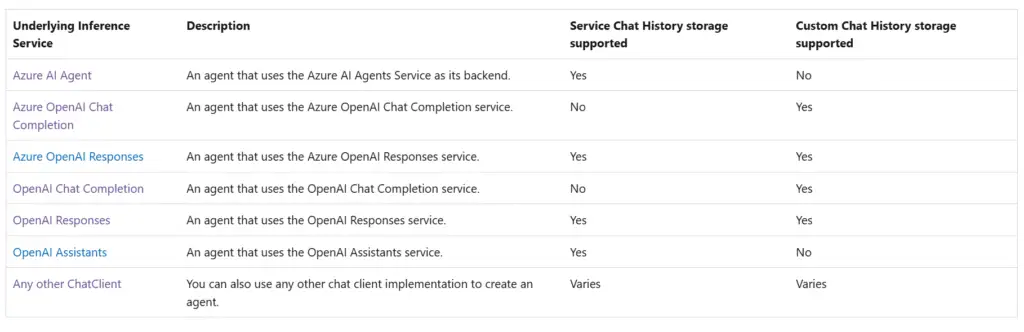
With support for various agent types, including Azure AI Agent and OpenAI Assistants, developers have the freedom to choose the best tools for their applications.
Supported Agent types:
Building a Simple AI Agents using Python:
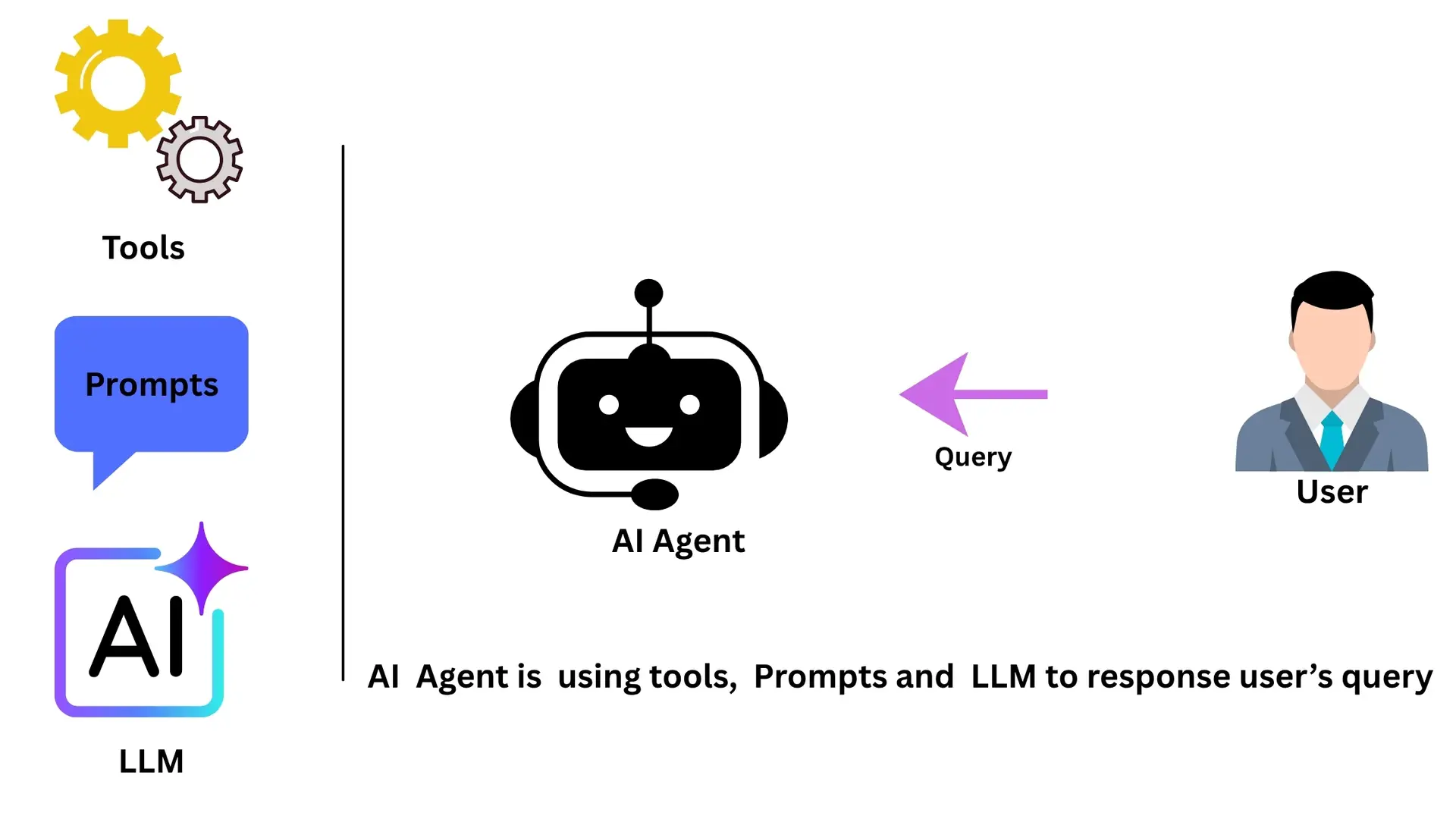
A Simple AI agent can consist of prompts, tools and a LLM model which it will use to give response to user’s query.
You can access complete code offered by Microsoft by clicking on this Github repo link: Link
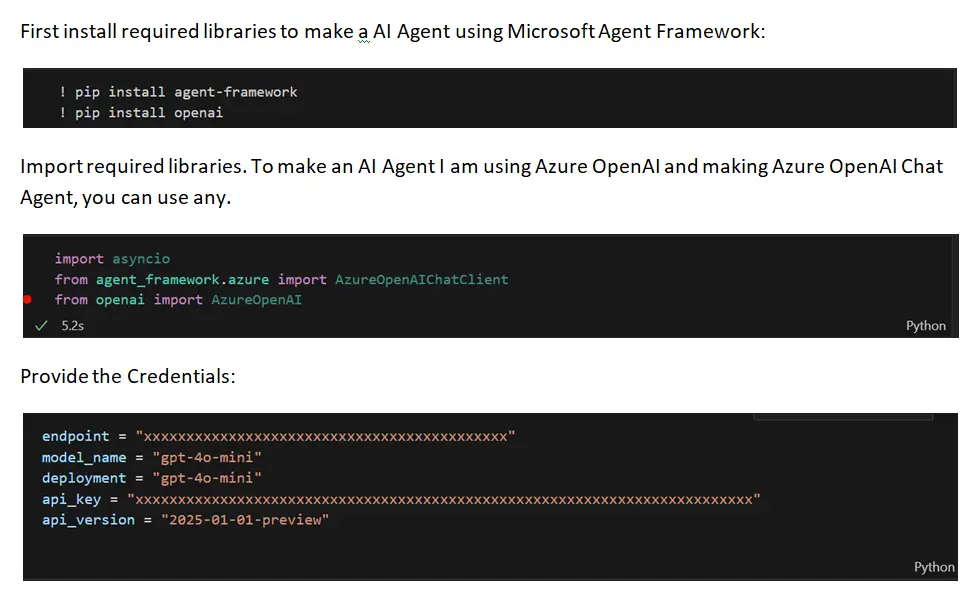
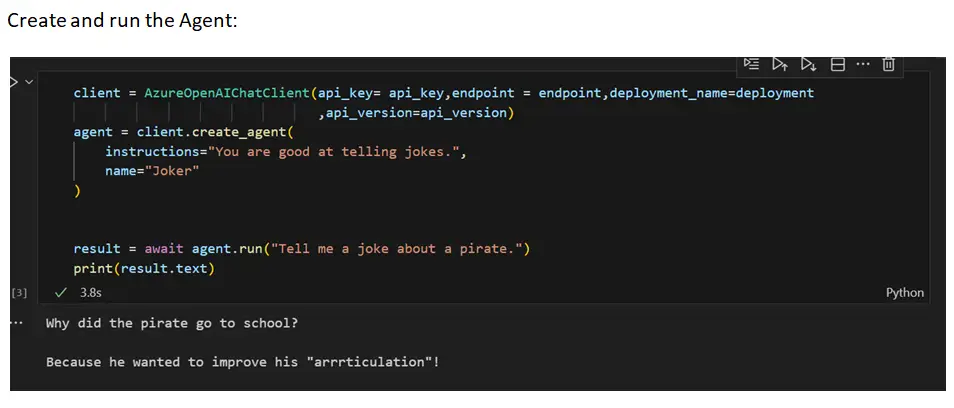
First, create a chat client for communicating with Azure OpenAI. Then, create the agent, providing instructions and a name for the agent.
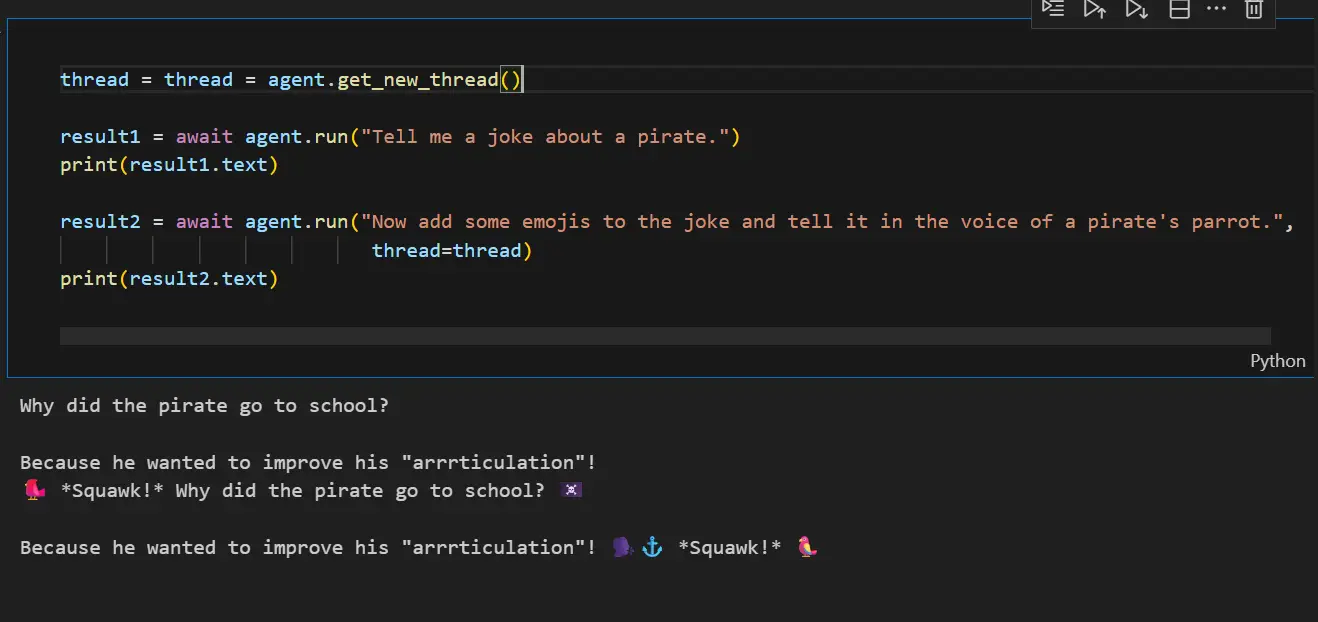
Running the agent with a multi-turn conversation.
Agents are stateless and do not maintain any state internally between calls. To have a multi-turn conversation with an agent, you need to create an object to hold the conversation state and pass this object to the agent when running it.
To create the conversation state object, call the get_new_thread() method on the agent instance.
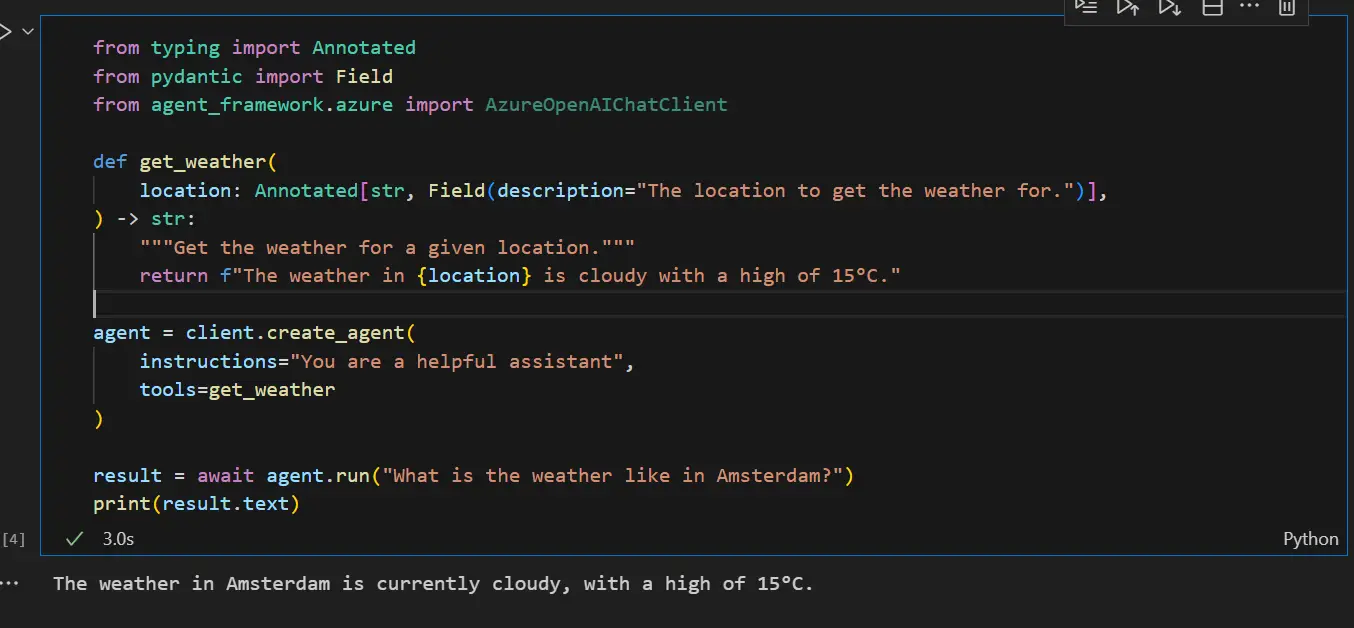
Create the Agent with Function Tools
2. Workflows: Orchestrating Multi-Agent Tasks
The framework empowers developers to design intricate, graph-based workflows that connect multiple agents and functions, enabling the execution of complex, multi-step tasks. Workflows provide a structured approach to managing the flow of operations, ensuring that objectives are met efficiently.
Key features of workflows include:
- Type-Based Routing: Direct requests to the appropriate agents based on their types for optimal performance.
- Nesting: Organize workflows hierarchically for improved management.
- Checkpointing: Save the state of workflows to allow resumption from specific points.
- Request/Response Patterns: Facilitate human-in-the-loop scenarios, integrating human input into automated processes.
Types of Workflows in the Agent Framework:
The Microsoft Agent Framework supports several types of workflows, including:
1. Sequential Workflows: Tasks are executed in a linear fashion, one after another.
2. Concurrent Workflows: Multiple tasks are executed simultaneously, allowing for more efficient processing.
3. Workflow on branching logic: The execution path changes based on specific conditions or outcomes, providing flexibility in decision-making.
Building a Simple Sequential Workflow:
We are going to create a workflow with two executors:
Upper Case Executor – Converts input text to uppercase
Reverse Text Executor – Reverses the text and outputs the final result
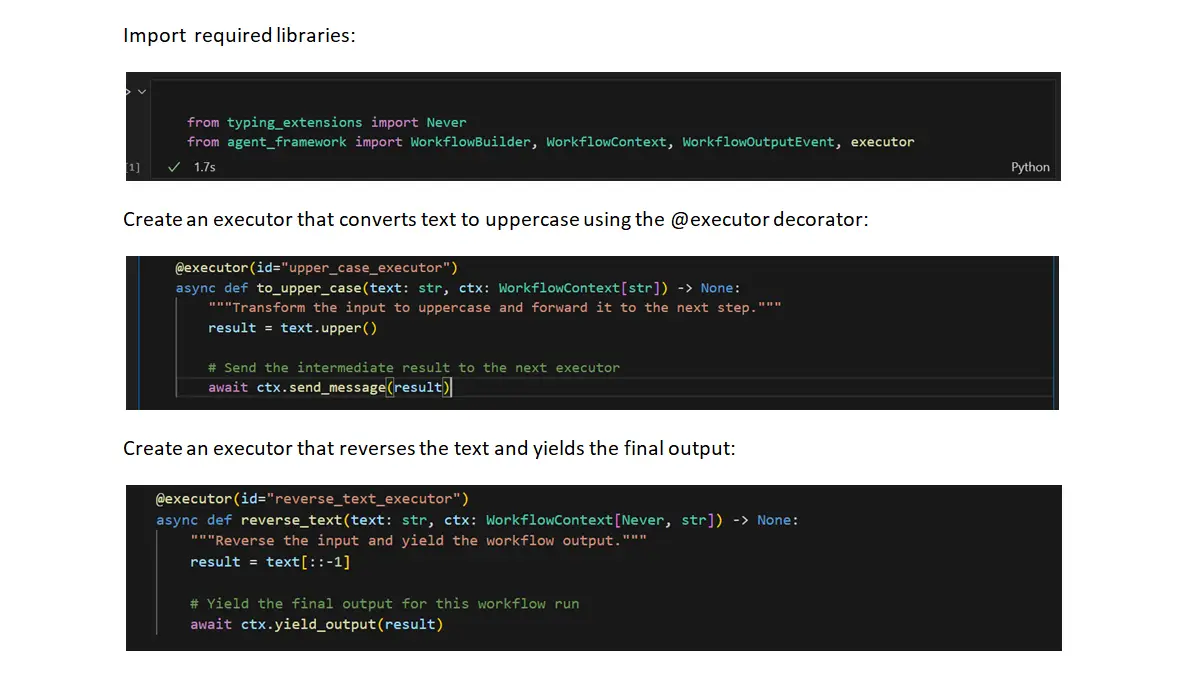
@executor decorator – Using this to create workflow nodes
ctx.send_message() – Passes data to the next output
ctx.yield_output() – Provides the final workflow result
WorkflowContext[str] – indicates this executor sends a string downstream
WorkflowContext[Never,str] – indicates this is terminal executor
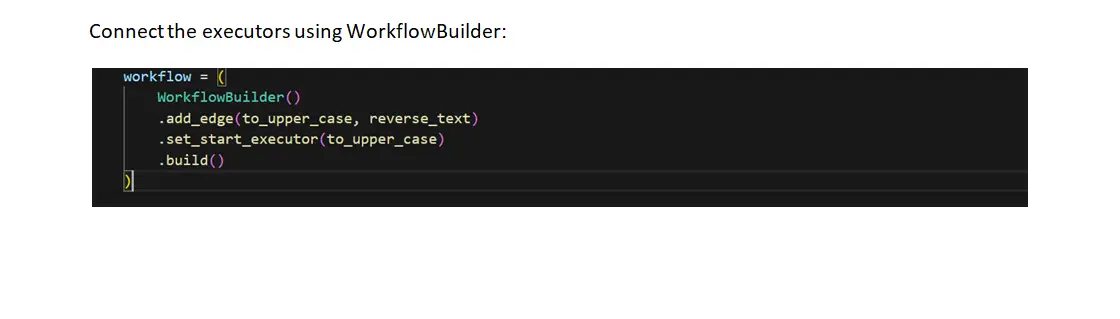
add_edge() creates directed connections between executors
set_start_executor() defines the entry point
build() finalizes the workflow
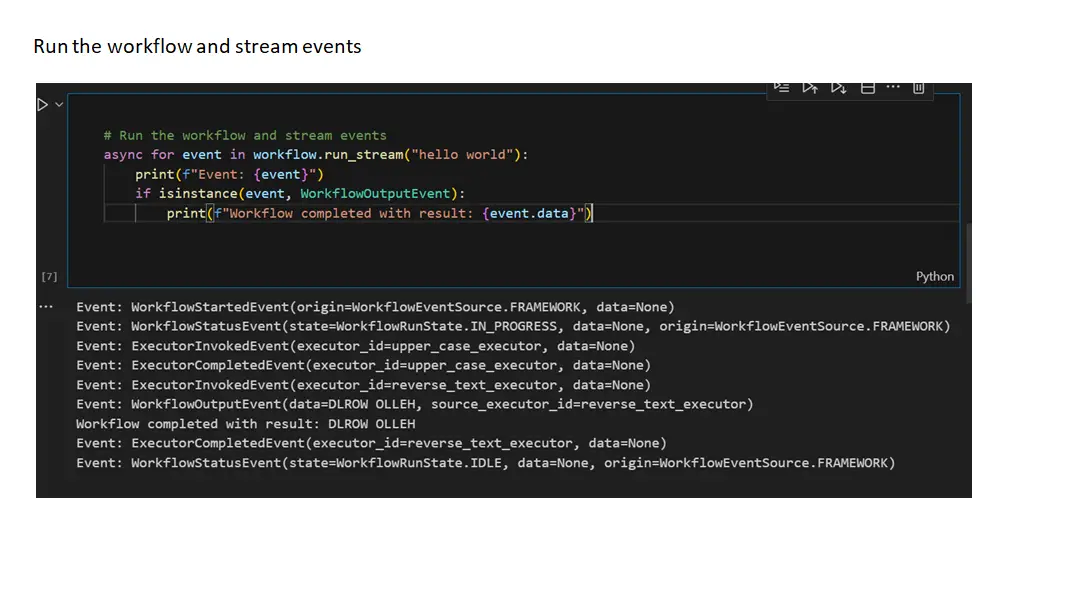
During streaming execution, you’ll observe these event types:
ExecutorInvokedEvent – When an executor starts processing
ExecutorCompletedEvent – When an executor finishes processing
WorkflowOutputEvent – Contains the final workflow result
Enhance Features of Microsoft Agent Framework
The Microsoft Agent Framework seamlessly combines user-friendly patterns with advanced capabilities, including:
- State Management: Robust handling of state for long-running tasks.
- Type Safety: Reduce errors by ensuring operations are performed on compatible types.
- Filters: Specify conditions under which certain actions are taken, enhancing control.
- Telemetry: Gain insights into agent performance and usage, facilitating informed decision-making.
- Diverse Model Support: Flexibility to choose different AI models for various applications.
Foundational Components Of Microsoft Agent Framework
To empower developers, the framework provides several foundational building blocks:
- Model Clients: Facilitate chat completions and response handling.
- Agent Thread: Manage the state of agents during execution.
- Context Providers: Offer memory management, allowing agents to recall past interactions.
- Middleware: Intercept agent actions for logging, monitoring, or modifying behavior.
- MCP Clients: Integrate various tools to enhance agent functionality.
Conclusion: Embrace the Future of AI Development
The Microsoft Agent Framework is a groundbreaking toolkit that equips developers with the flexibility and features needed to build interactive, robust, and secure AI applications. By merging the strengths of Semantic Kernel and AutoGen, it streamlines the development of complex multi-agent systems and enhances overall management capabilities.
Are you ready to step into the future of AI development? Embrace the power of the Microsoft Agent Framework and unlock endless possibilities for creating intelligent systems that can transform industries and improve user experiences.
Normally I don’t read post on blogs, but I would like to say that this write-up very forced me to try and do so! Your writing style has been surprised me. Thanks, very nice article.
I consider something truly special in this web site.